

Table of Contents
- Why Organizing Story Ideas Matters
- Digital vs. Analog: Which Method Suits Your Workflow
- Building Your File Hierarchy and Folder Structure
- Creating a Centralized Master File for Your Story
- Best Software for Writers: Tools That Streamline Organization
- Novel Plotting Templates and Character Bibles
- Creative Writing Organisation Tips: Tagging, Naming, and Retrieval
- How to Outline a Book Using Your Organized Notes
Last Updated: August 16, 2026
Why Organizing Story Ideas Matters
A scattered collection of brilliant ideas is just noise. The difference between a finished manuscript and a half-draft sitting in a folder isn't talent, it's structure. When you can't find that perfect character detail you wrote months ago, momentum dies. Organisation transforms your creative process from a frustrating hunt through digital chaos into a simplified workflow where every idea has a home.
Writers often believe that organisation stifles creativity. The opposite is true. The moment you stop hunting for notes and start building on them, your storytelling accelerates. You spend less time remembering what you've already written and more time actually writing.
The challenge most writers face isn't finding ideas. It's managing them once they arrive. A single story might contain dozens of character sketches, plot variations, worldbuilding notes, and research materials scattered across notebooks, voice memos, and random files. Without a system, you're working from memory instead of a reliable archive.
Digital vs. Analog: Which Method Suits Your Workflow
The choice between digital and analog tools isn't about which is objectively better, it's about which matches how your brain works. Many writers find that a hybrid approach works best: digital tools for searchability and backup, analog tools for the creative spark.
Digital organisation excels at searchability and scalability. A cloud-based system means your story notes sync across devices. You can tag a character detail and find it instantly months later. The drawback: screens can feel sterile during the creative phase, and the temptation to edit instead of writing is constant.
Analog organisation engages a different part of your creative mind. Writing by hand slows you down in a useful way. Physical cards can be spread across a table and rearranged by intuition. The limitation: analog doesn't scale well, and retrieval becomes laborious once your project grows.
The practical answer: use analog for the creative brainstorm phase and digital for the archive and retrieval phase. Capture ideas however feels natural, then move them into a searchable digital system.
Building Your File Hierarchy and Folder Structure
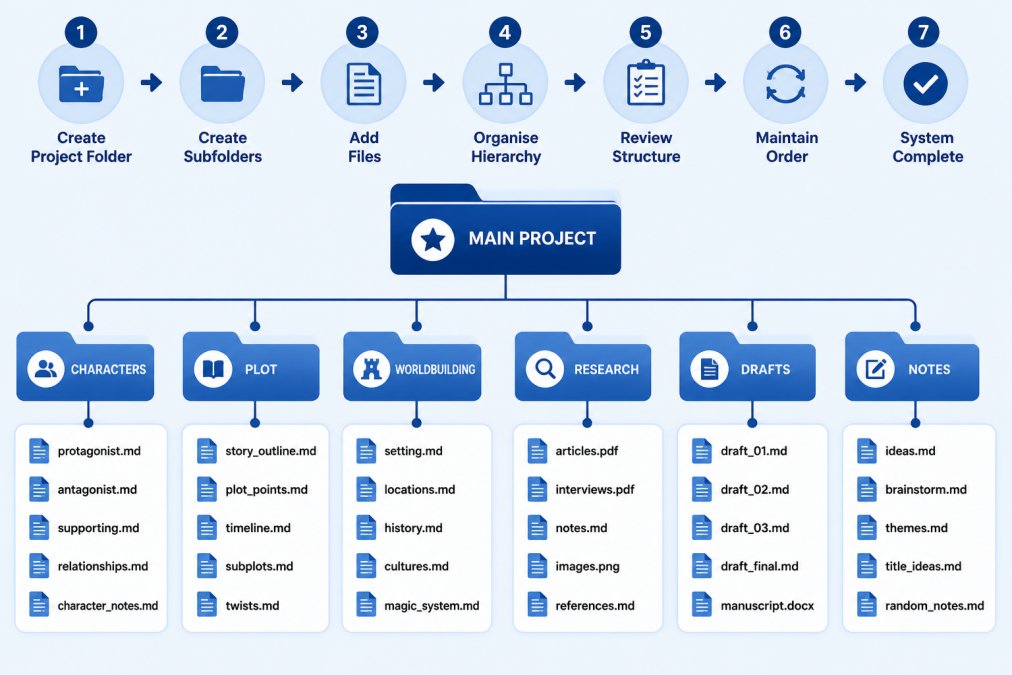
Your folder structure is the skeleton of your organisation system. The key principle: nest folders by story element, not by date or draft status.
Start with a master project folder. Inside, create primary folders for the major components of your story:
- Characters, all character bibles, profiles, and relationship maps
- Plot, outline variations, scene breakdowns, and story beats
- Worldbuilding, setting details, magic systems, timelines, and cultural notes
- Research, reference materials, fact-checking sources, and inspiration
- Drafts, numbered versions of your manuscript
- Notes & Brain Dump, random ideas and dialogue fragments
Within each folder, create subfolders for specific elements. Your Characters folder might contain individual files for each major character plus a master character bible. Your Worldbuilding folder might have subfolders for Geography, History, Magic System, and Culture.

Use consistent naming conventions. Name files "Morgan_Protagonist_v3" or "Character_Morgan_Backstory_Final" instead of "Character - Morgan - Final Version 3". Include version numbers and status markers in the filename itself.
Creating a Centralized Master File for Your Story
A master file is your story's command centre. This is a single document that contains all critical information: the story premise, character list with brief profiles, plot outline, key worldbuilding rules, and links to all supporting documents.
The master file serves three purposes. First, it's your quick reference when you need to check your protagonist's eye colour or a kingdom's name. Second, it's your continuity check before submitting your manuscript. Third, it's your project overview when you return to a story after weeks away.
Structure your master file like this:
Story Premise, a single paragraph describing your story's central conflict and stakes.
Character Quick Reference, a table listing each major character with their role, primary goal, and one defining characteristic. Link to full character bibles for deeper detail.
Plot Outline, your three-act structure or story beats with brief descriptions of major turning points.
Worldbuilding Rules, the non-negotiable elements of your world: magic system limitations, geography constraints, cultural norms.
Timeline, if your story spans months or years, a timeline prevents continuity errors.
Links to Supporting Documents, pointers to your detailed character bibles, scene breakdowns, and research folders.
Update your master file as your story evolves. It should always reflect your current understanding of the project.
Best Software for Writers: Tools That Simplify Organisation
The right software removes friction from your workflow. You're looking for tools that handle file hierarchy, tagging, cross-referencing, and searchability.
Notion works well for writers who want flexibility. You can create linked databases for characters, plot points, and worldbuilding elements. Search across your entire project. Many writers use Notion as their master file because it handles cross-linking beautifully.
Scrivener is purpose-built for long-form writing projects. It handles manuscript organization, character tracking, and research compilation in a single application. The folder hierarchy is intuitive for writers.
Google Docs or Microsoft Word with a disciplined folder structure works for writers on a budget. You won't get fancy tagging, but you can organize story elements logically and search across files.
Obsidian excels at creating connections between ideas. You can write notes about characters and worldbuilding, then link them together. The search function is powerful and it works offline.
The tool itself matters far less than having a consistent system. A writer using Google Docs with perfect organization will outpace a writer using premium software with chaotic filing.
Novel Plotting Templates and Character Bibles
A character bible is your character's permanent record. It prevents continuity errors and keeps your characterization consistent across hundreds of pages.
Your character bible should include:
Basic Information, name, age, appearance (height, build, distinctive features), occupation, social status. Be specific: "6'2", athletic build, scar across left eyebrow" is useful.
Personality & Psychology, core values, fears, desires, flaws. How does this character handle stress? What would they never do, and why?
Background, family history, formative experiences, trauma, achievements.
Voice & Speech Patterns, how does this character speak? Do they use formal language or slang? Do they have catchphrases or accents?
Relationships, how does this character relate to other major characters? What's the dynamic?
Character Arc, where does this character start emotionally? Where do they end? What's the journey?
For plot organization, create a story beats document that breaks your narrative into key turning points:
- Inciting incident
- First plot point (the commitment)
- Midpoint (stakes escalate)
- Second plot point (final push toward climax)
- Climax
- Resolution
Map your scenes to these beats. This gives you a skeleton to hang your chapters on and prevents the middle from sagging. If you're looking for structured guidance on developing your story's architecture, Creative Story Mastery walks you through these frameworks in depth.
Creative Writing Organisation Tips: Tagging, Naming, and Retrieval
A tagging system is how you retrieve information months after you've written it. Without tags, your notes become forgotten.
Create consistent tag categories:
Status Tags, Draft, Final, Archived, Needs Revision.
Content Tags, Character, Plot, Worldbuilding, Dialogue, Research, Scene.
Priority Tags, Critical, Important, Optional.
Stage Tags, Brainstorm, Development, Editing, Revision.
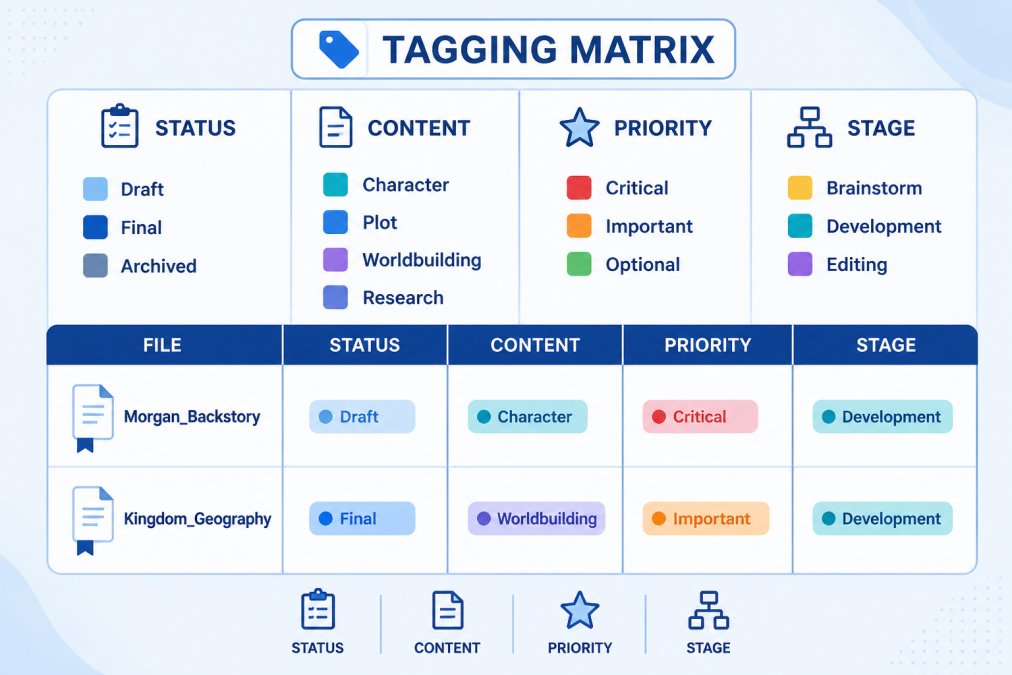
Your file naming convention should embed key information. Use "Scene_Confrontation_Morgan_v2" or "Worldbuilding_Magic_Limitations_Final" instead of "Notes 47".
Create a searchable index if you're using analog notes. A simple spreadsheet listing each notebook, page number, and brief description turns a stack of notebooks into a retrievable archive.
The brain dump is your permission slip to capture every idea without organizing it immediately. Dedicate a folder to raw ideas, dialogue fragments, and scene sketches. Review your brain dump weekly. Move polished ideas into their proper homes. Delete what no longer resonates.
How to Outline a Book Using Your Organized Notes
Your organized notes become your outline. Pull your character bibles, worldbuilding documents, and plot beats. Open your master file. Now build your outline by asking: what does each character want? What stands in their way? How do these conflicts intersect?
Start with a high-level outline showing your three acts and major turning points. Then expand each section into scenes. A scene outline includes:
- Scene number
- POV character
- Setting
- What happens
- What changes (how does this scene move the story forward?)
- Key dialogue or moments to remember
This level of detail prevents you from writing scenes that don't advance the plot. Every scene should answer: why does this scene exist?
Use your research folder to inform scene details. Your organized research becomes the texture of your storytelling.
Many writers find that outlining with organized notes takes less time than writing without one. You're executing a plan you've already thought through, which speeds up the first draft significantly. If you want personalized support turning your organized notes into a finished manuscript, Writing Coaching can help you move from planning to completion.
The outline isn't sacred. As you write, you'll discover new directions. Update your outline to match what's actually happening.
Organizing story ideas isn't busywork that delays your real writing. It's the foundation that makes real writing possible. When every character detail, plot point, and worldbuilding element has a home, you stop losing ideas and start building on them. You spend less time remembering what you've written and more time writing what comes next.
If you're serious about finishing your story, start by organizing what you already have. Build a master file. Create your folder structure. Establish your tagging system. Then write. The structure you've built becomes invisible, it's just the foundation that lets your creativity flow without friction. Whether you're outlining your first novel or revising a manuscript that's been waiting, the right system transforms how you work. Join the conversation, leave a comment, start a discussion, and bring something creative and positive. Grab a coffee and let's chat.
Frequently Asked Questions
What's the best way to keep track of writing ideas so I don't lose them?
Capture ideas immediately in a designated space, whether that's a notes app, notebook, or voice memo, then file them into your central system weekly. Use consistent file naming and tagging so you can find them later. Many writers use a 'brain dump' folder for raw thoughts, then sort and categorize them during a weekly review. The key is having one trusted place where all your ideas live, not scattered across multiple apps or notebooks.
Should I use software or a notebook to organise story ideas?
Both work, depending on your workflow. Digital tools offer searchability, version control, and easy syncing across devices, essential if you draft on your phone and edit on your laptop. Notebooks and index cards feel tactile and help some writers think more creatively. Many writers combine both: use a notebook for initial brainstorming, then transfer structured notes into digital software for retrieval and manuscript development. Test both and stick with what lets you write consistently.
How do I turn a random idea into a structured story without losing the spark?
Start by capturing the raw idea exactly as it comes, don't edit or organize it yet. Then, in a separate session, ask yourself what story structure it fits into. Use a plotting template to identify your beginning, middle, and end. Build a character bible for key players and a worldbuilding document for the setting. This structure doesn't kill creativity; it gives your ideas a framework so you can develop them fully without losing track of what made them exciting in the first place.
How do I manage multiple story projects at once without getting overwhelmed?
Create a master index or project dashboard that lists all your active projects, their status (brainstorm, drafting, editing), and key metadata like genre and target word count. Keep each project in its own folder with consistent subfolders for plot, characters, research, and drafts. Use colour coding or tags to flag priority projects. This way, you can switch between stories without losing context, and you'll know at a glance which project needs your attention next.
This article was written using GrandRanker